ID & QR Code Generator
Generate, print, and export batch scannable QR Code ID cards for all enrolled students and school personnel to use at gate scanners.
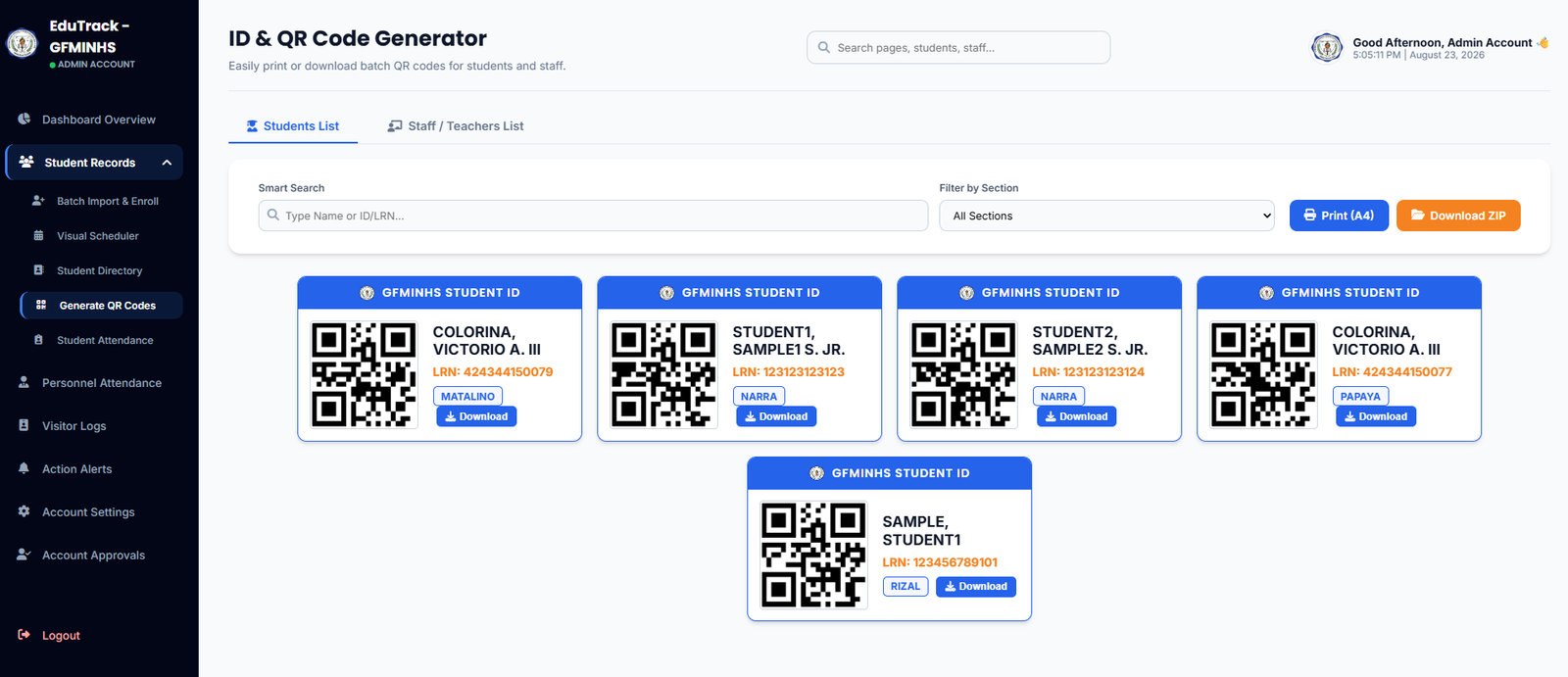
Figure 2.5: ID & QR Code Generator with A4 batch print and ZIP download controls
Batch & Export Functions
🖨️ Print (A4)
Generates a ready-to-print A4 document layout arranging multiple ID cards in a grid. Perfect for batch card printing, laminating, or pasting onto standard school IDs.
📦 Download ZIP
Bundles every generated QR code as an individual high-resolution PNG image file into a single compressed .zip archive for external graphics processing.
👥 Staff / Teachers Tab
Switch between the Students List and Staff / Teachers List tabs to generate faculty and non-teaching personnel attendance QR badges.
How to Filter and Produce QR Badges
-
1
Filter by Section or Search by Name
Use the "Filter by Section" dropdown to isolate a specific class (e.g., Narra, Matalino, Papaya) or type a specific student name/LRN into the Smart Search box.
-
2
Individual ID Card Download
To provide a single replacement ID, click the blue "📥 Download" button directly below the student's ID preview card.
-
3
Batch Printing a Whole Class
Select a section → click "🖨️ Print (A4)" → in your browser print dialogue, choose "Save as PDF" or select your color printer to produce the entire class set at once.