Administrator Dashboard Overview
The central monitoring cockpit for school administrators. It provides live student attendance counts, staff presence logs, campus shift headcounts, and emergency suspension alert tools.
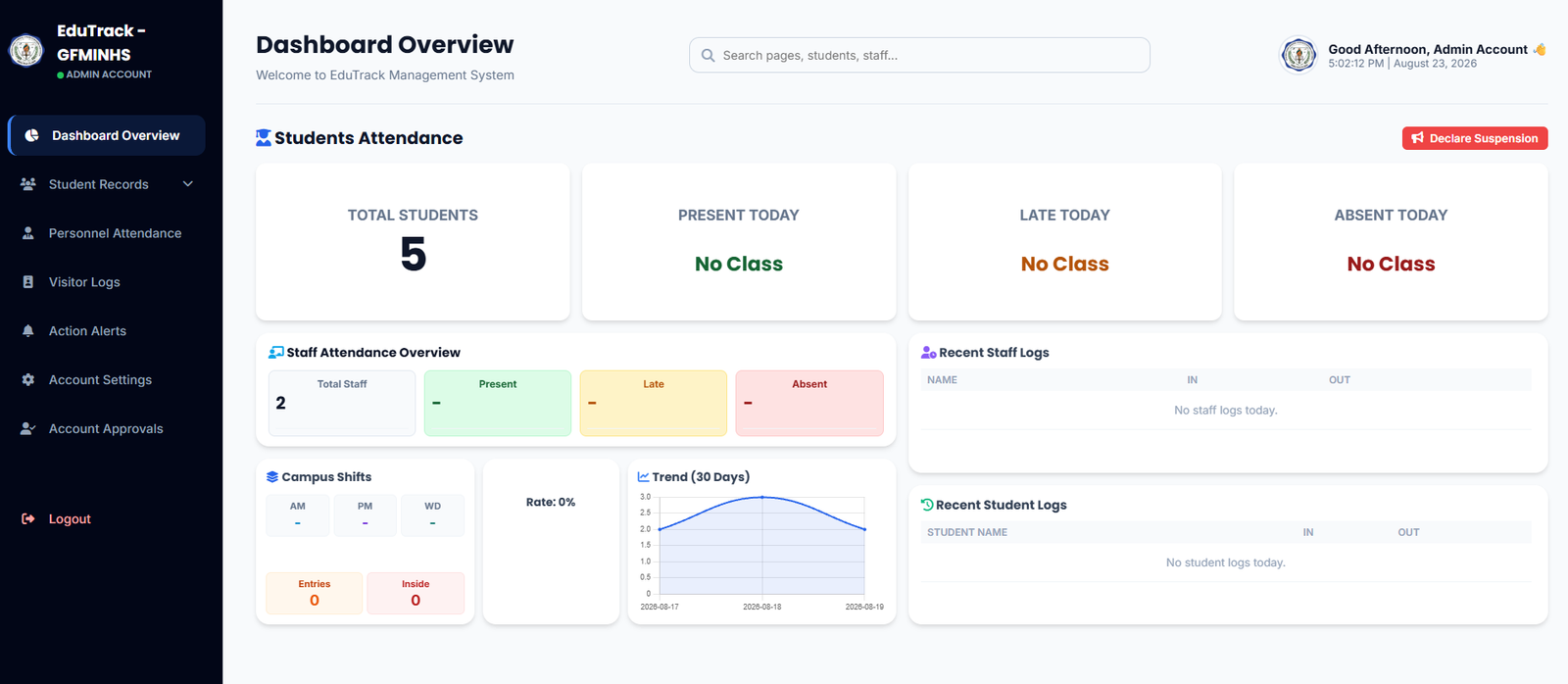
Figure 2.1: EduTrack-ph Administrator Dashboard Overview Screen
Dashboard Sections & Features
Admin Sidebar Menu
Enables navigation to all administrative modules including Student Records, Personnel Attendance, Visitor Logs, Action Alerts, and Account Approvals.
Global Search & Profile Bar
Search across student records, staff, and pages with instant indexing. Displays the administrator's account name and live system date/time clock.
Student Attendance Cards
High-level real-time counters displaying Total Students, Present Today, Late Today, and Absent Today.
Declare Suspension (Emergency)
A quick-action button that allows administrators to declare school-wide class suspensions due to weather, emergencies, or holidays.
Staff Attendance & Campus Shifts
Monitors faculty presence and shift distributions (Morning Shift AM, Afternoon Shift PM, and Whole Day WD) along with campus inside/entry headcounts.
Live Activity Feeds (Recent Logs)
Real-time stream tables showing the latest IN and OUT scan timestamps for both personnel and students.
Common Admin Workflows
-
1
Searching for a Student or Staff Member
Click on the top search bar (or press Ctrl + K / tap search) and enter an LRN, Employee ID, or Name to instantly open their detailed record.
-
2
Declaring Class Suspensions
Click the red "📢 Declare Suspension" button in the upper right. Select the target grade levels, shifts, or entire school, and confirm to halt automated absent alerts and update parent dashboards.
-
3
Reviewing 30-Day Attendance Trends
Examine the Trend (30 Days) graph to identify school-wide attendance spikes or drops, assisting in data-driven administrative decisions.