Gate Access Command Center
The live entry-gate scanning kiosk. Processes high-speed student QR scans, verifies punctuality in real time against shift schedules, logs visitors, and dispatches parent alerts.
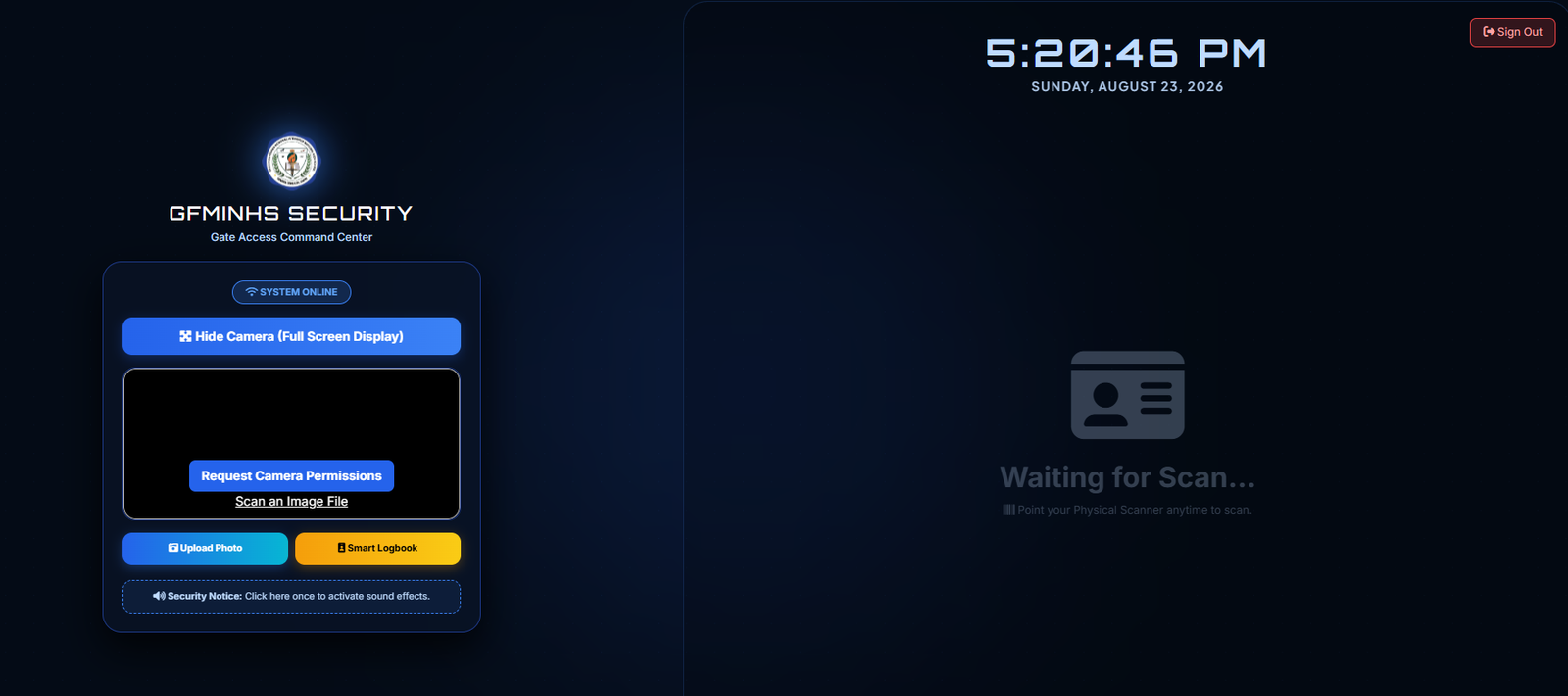
Figure 4.1: Gate Access Command Center with camera terminal, sound controls, and live scan stage
Terminal Components & Functions
📷 Dual Scanner Compatibility
Supports built-in Webcam video scanning and Hardware USB / Bluetooth Barcode Scanners. Hardware scanners work instantly in the background without camera latency.
🔊 Audio Verification Chimes
Clicking the "Security Notice" button initializes audio playback, giving distinctive audible chimes for Valid Scans, Tardy/Late Scans, and Unregistered Badges.
📋 Smart Logbook & Photo
Use "Smart Logbook" to search students without physical badges and "Upload Photo" to log outside visitors and guest entries.
🗖 Kiosk Mode (Hide Camera)
Click "Hide Camera (Full Screen Display)" to maximize the student identification display, creating an uncluttered kiosk monitor facing students at the gate.
Guard Gate Duty Operations
-
1
Initialize Camera Permissions
Upon loading, click "Request Camera Permissions" and select "Allow" in your browser prompt to activate the gate webcam.
-
2
Enable Sound Effects
Click the "🔊 Security Notice" button at the bottom of the left card once to enable audible sound confirmations for students.
-
3
Process Incoming Students
Students present their QR ID to the camera or laser scanner. The right screen instantly flashes their Photo, Name, Grade & Section, and Entry Status (On Time / Late).